Using todonotes to insert notes in LaTeX
When I am writing the thesis, sometimes I am inspired by some papers and then will add some contents. For sure I will properly cite these papers but after a short/long period, when I come back to this part, I may always forget where this idea is from (specific part of the cited papers). So I urgently need something to add notes in the compiled PDF files. It is very easy to add notes in Microsoft Office or any other PDF editing software. But for LaTeX, you will need a package named todonotes.
The complete tutorial can be found in this link.
Here I will only introduce some of the functions.
Before you start, remember to add this package to the document preamble.
1
\usepackage{todonotes}
Move the cursor to the place where you want to add notes, and type
1
\todo[color=yellow!40, inline]{Inspired by Renjie Li!}
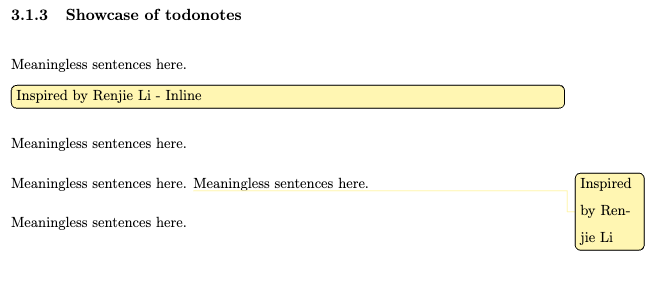
Let me show you what is the difference between adding/no inline commands.
This is the sample LaTeX code:
1
2
3
4
5
6
7
8
9
Meaningless sentences here.
\todo[color=yellow!40, inline]{Inspired by Renjie Li - Inline}
Meaningless sentences here.

Meaningless sentences here.
\todo[color=yellow!40]{Inspired by Renjie Li}
Meaningless sentences here.

Meaningless sentences here.
And this is how it looks like. To my understanding, inline command automatically adds one line under the sentence.